SchiermonnikoogLauwersoogHarlingenMakkumWorkumHindeloopenStavorenKornwerderzandMedemblikAndijkSchellinkhoutEnkhuizenTexel Paal 9JulianadorpCallantsoogPettenCamperduinWijk aan ZeeIJmuiderslagZandvoortNoordwijkKatwijkScheveningenKijkduinHoek van HollandMaasvlakte SlufterRockanjeOuddorpBrouwersdamNeeltje JansVrouwenpolderDomburgVlissingenBreskensCadzand-BadKnokke-HeistOostendeNieuwpoortSchiermonnikoogLauwersoogHarlingenMakkumWorkumHindeloopenStavorenKornwerderzandMedemblikAndijkSchellinkhoutEnkhuizenTexel Paal 9JulianadorpCallantsoogPettenCamperduinWijk aan ZeeIJmuiderslagZandvoortNoordwijkKatwijkScheveningenKijkduinHoek van HollandMaasvlakte SlufterRockanjeOuddorpBrouwersdamNeeltje JansVrouwenpolderDomburgVlissingenBreskensCadzand-BadKnokke-HeistOostendeNieuwpoort
The wind, the spot and your own sessions.In one place.
We're building the place where you check the wind before your session, collect your own numbers during it, and afterwards see what went better. More than four hundred and seventy spots in twenty-three countries, from the Wadden coast to the Red Sea — and that's not where it stops.
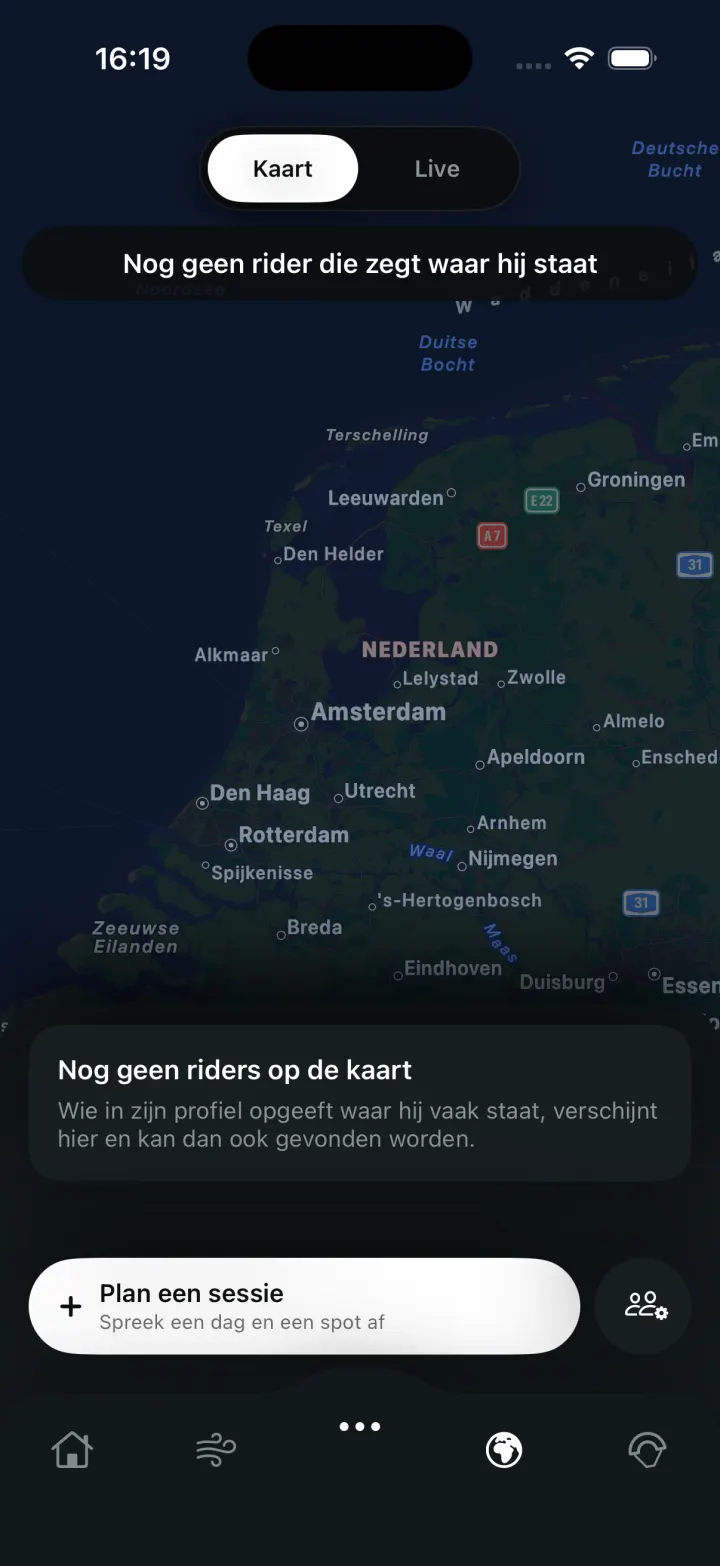
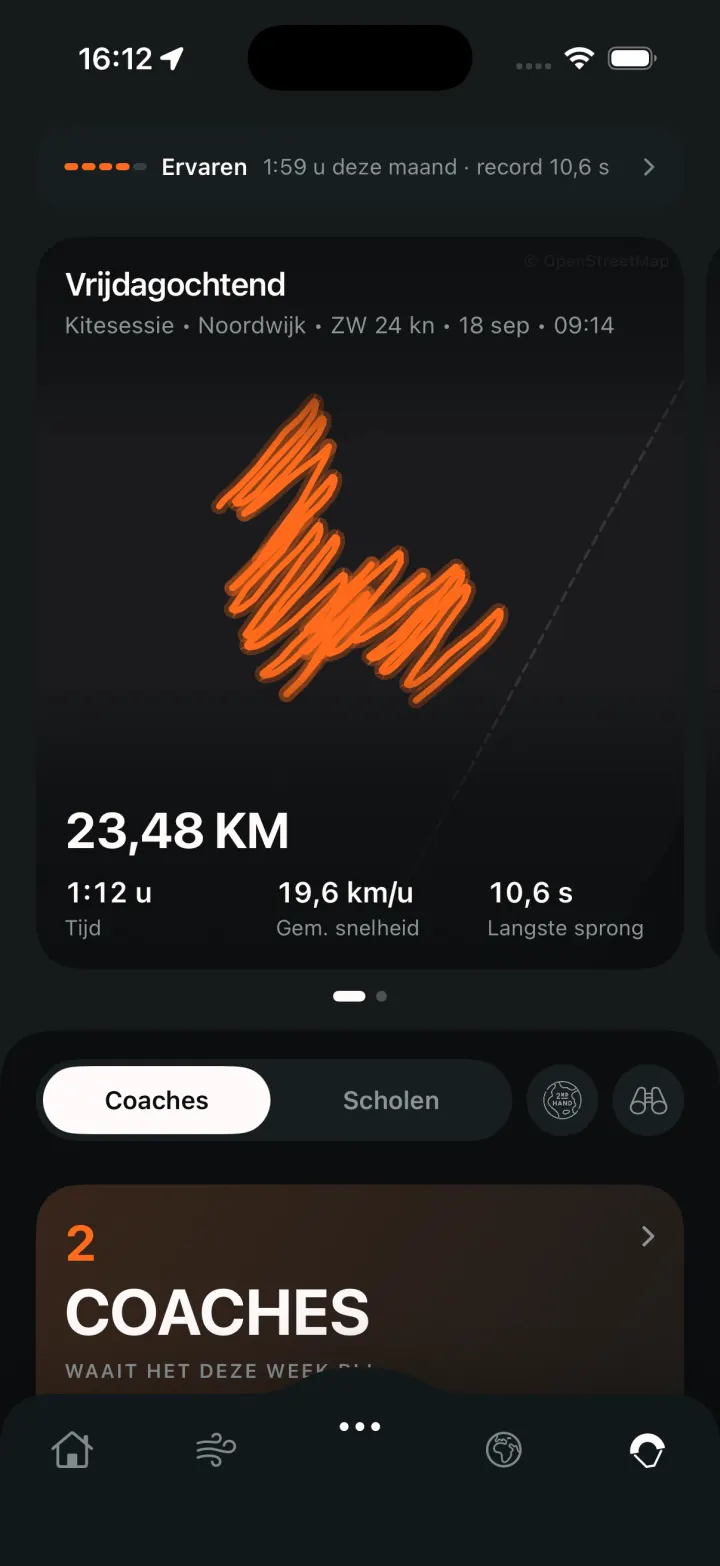
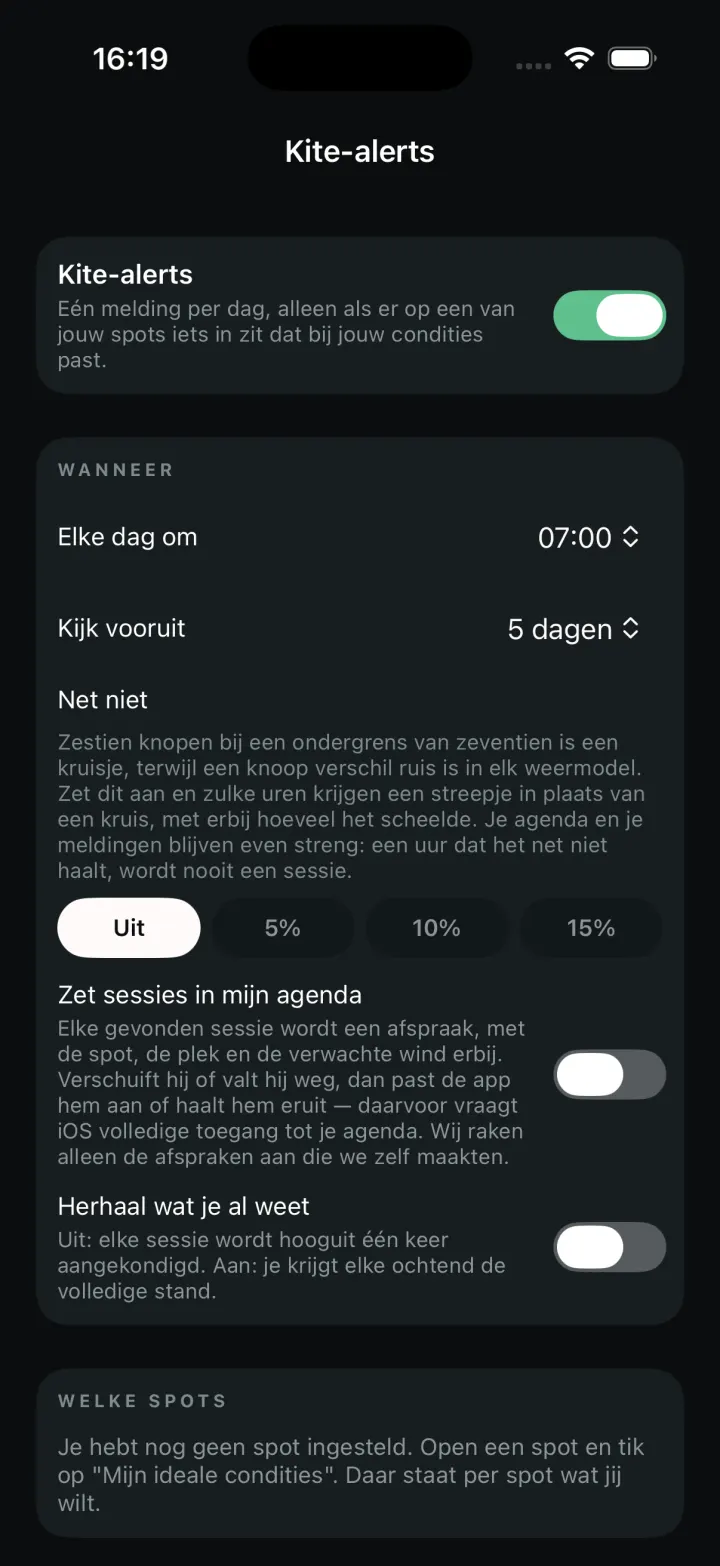
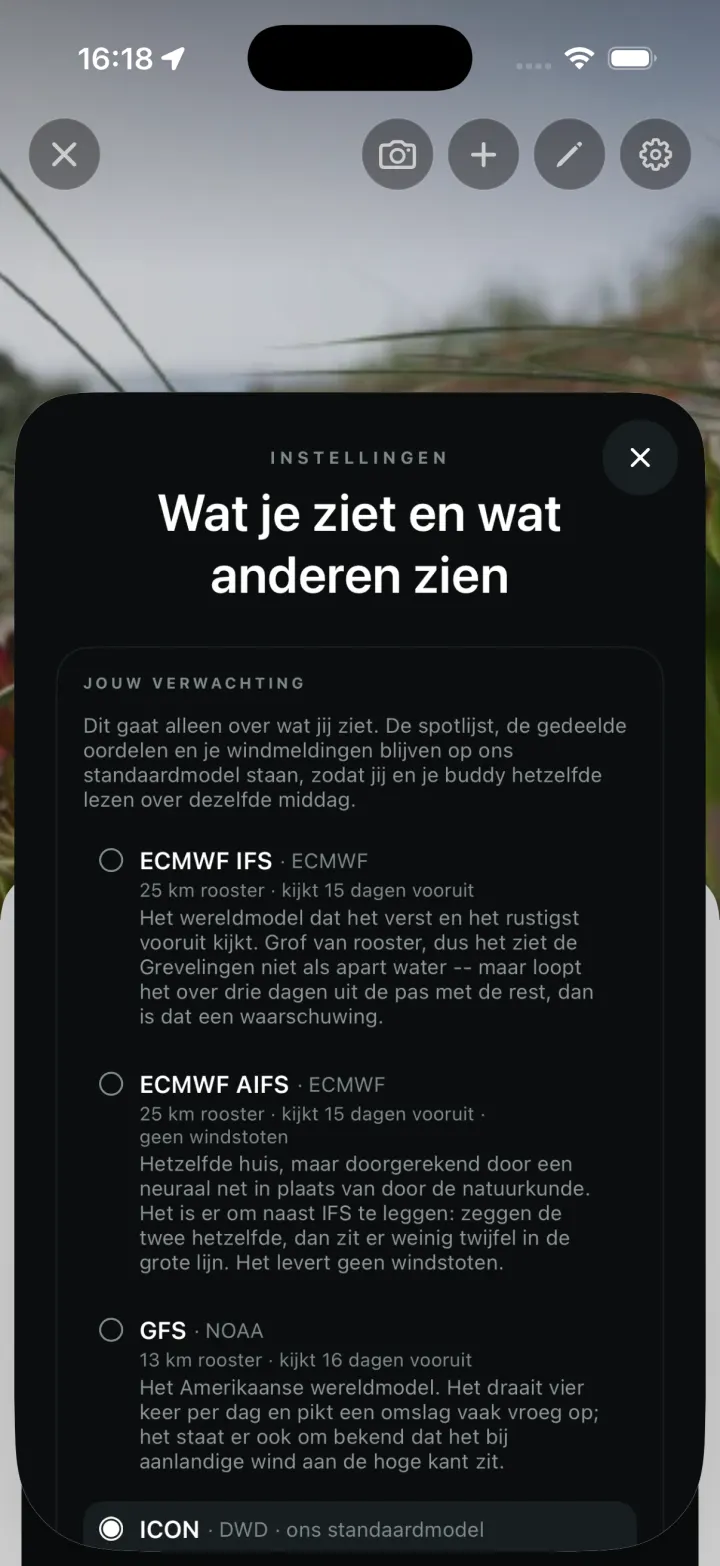
Here's what it looks like
Eight screens from the app as it runs today — no mock-ups, and so no lists that look fuller than they are.
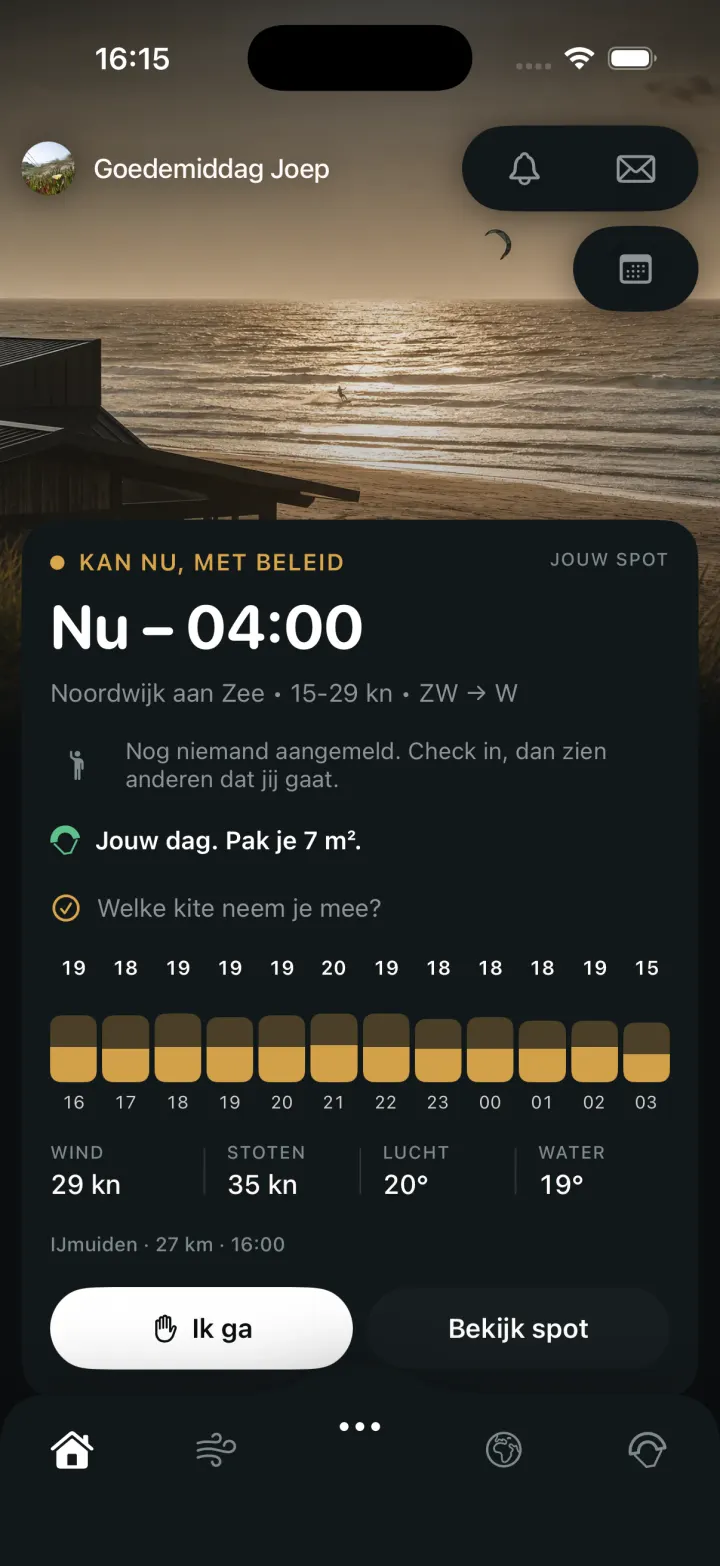
TodayWhether it's on right now, at your spot and for your weight: the window, the kite size, and who has already said they're going.
What's coming
The spot and the wind
What you check before you go.
01
Every spot, with the wind right now
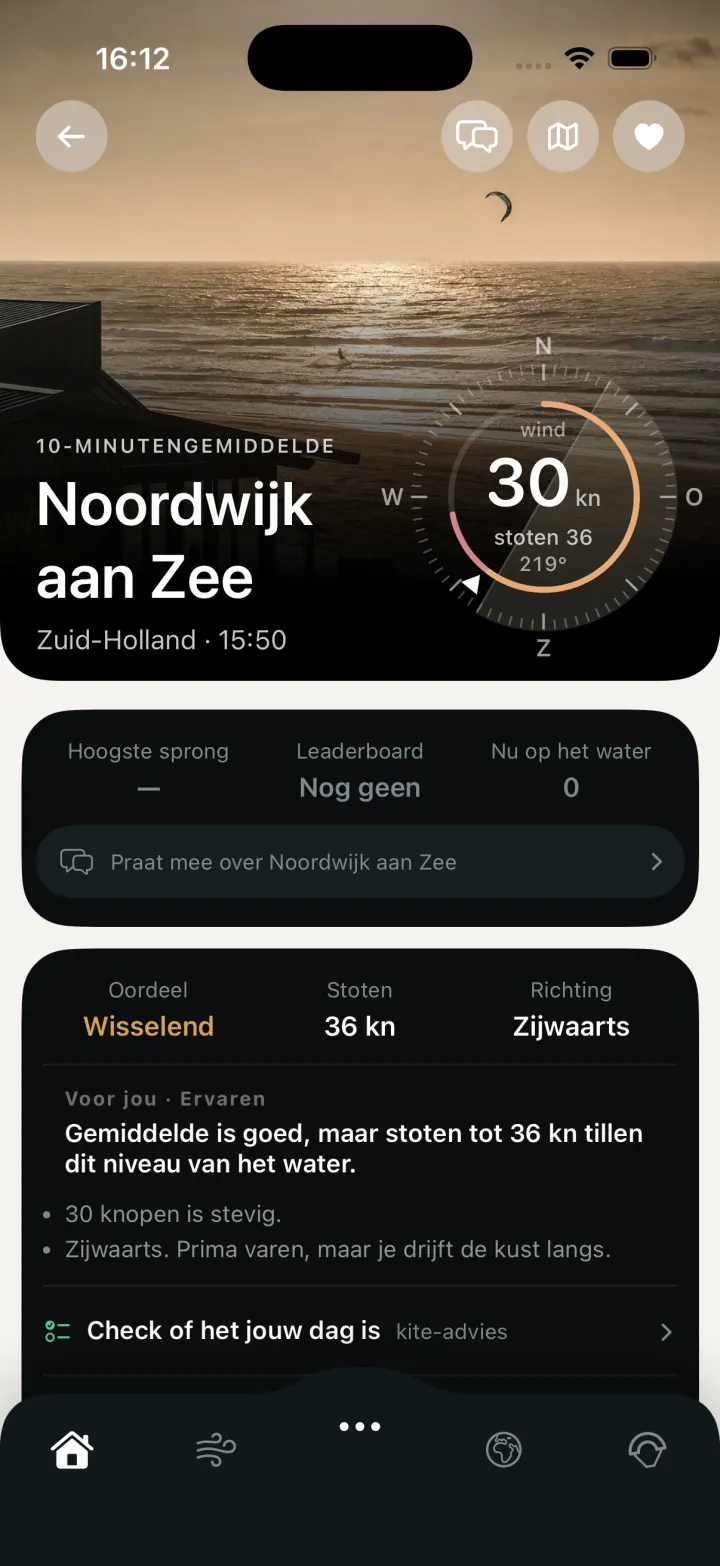
More than four hundred and seventy kite spots in twenty-three countries, from Schiermonnikoog to Cape Town. With the wind at this moment, the hourly forecast, the tide, and what you need to know before you pump up.
02
More than one model
Weather models disagree with each other, and that disagreement is information. You see them side by side per hour, so you can judge for yourself whether Saturday's eighteen knots rest on something or whether one model is out on its own.
03
Whether today is your day
Enter your weight and your kites. The spot page works it out for your size and tells you whether this is a day for you to go.
04
What a spot asks of you
Current, shallows, where to rig, where to stay clear of, and whether a permit applies. With the source beside it, so you can see where it came from and how old it is.
05
Your own list
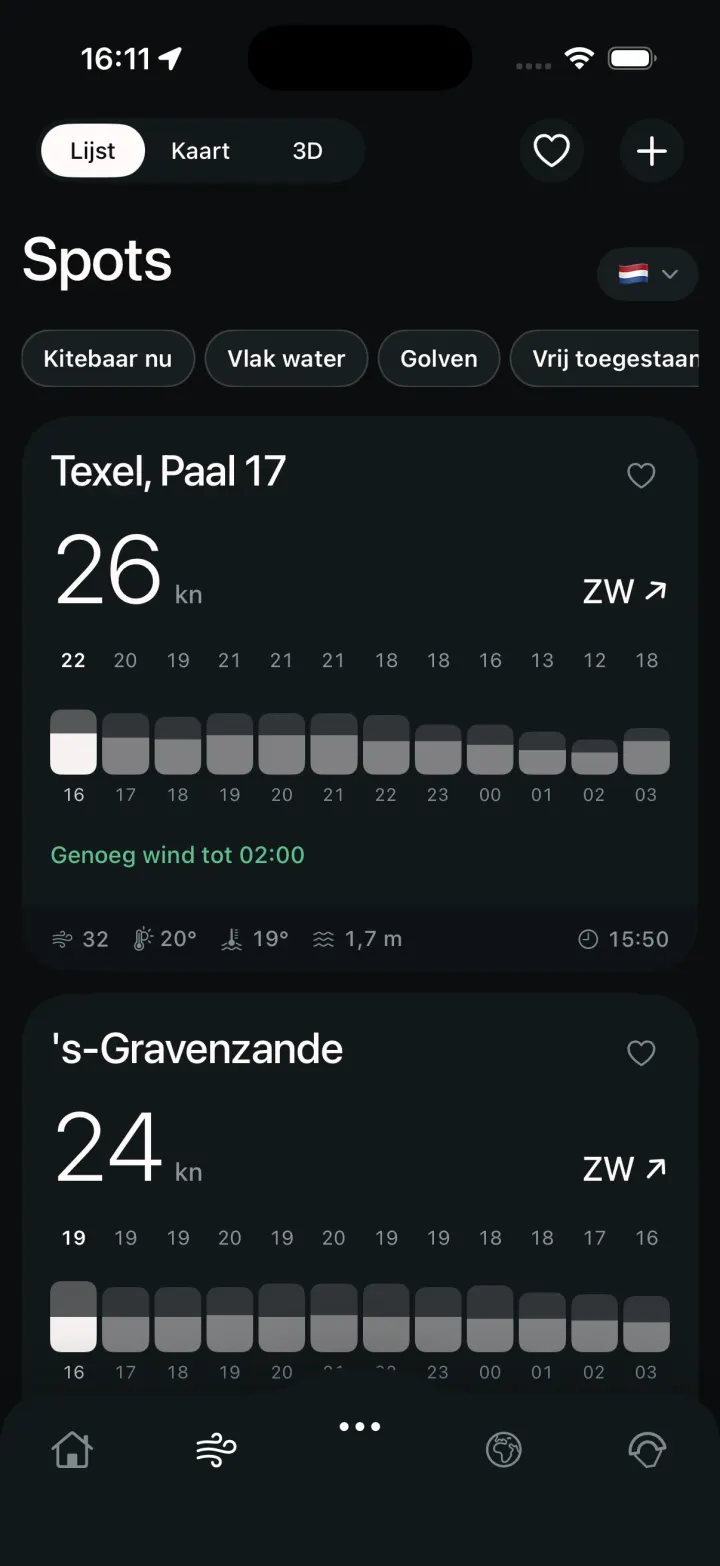
Put the spots you ride on your list and see today's and tomorrow's wind for all of them at a glance, without looking them up one by one.
06
A nudge from your own knotsMAX
You set it: Brouwersdam, from eighteen knots. When the forecast goes over that, you get a push message. A separate limit per spot, because the wind that makes a day in one place isn't enough in another.
07
Your spot isn't listed
Then you request it. We work out the shore orientation, look at which wind directions work there, and add it.
08
Wind across the map
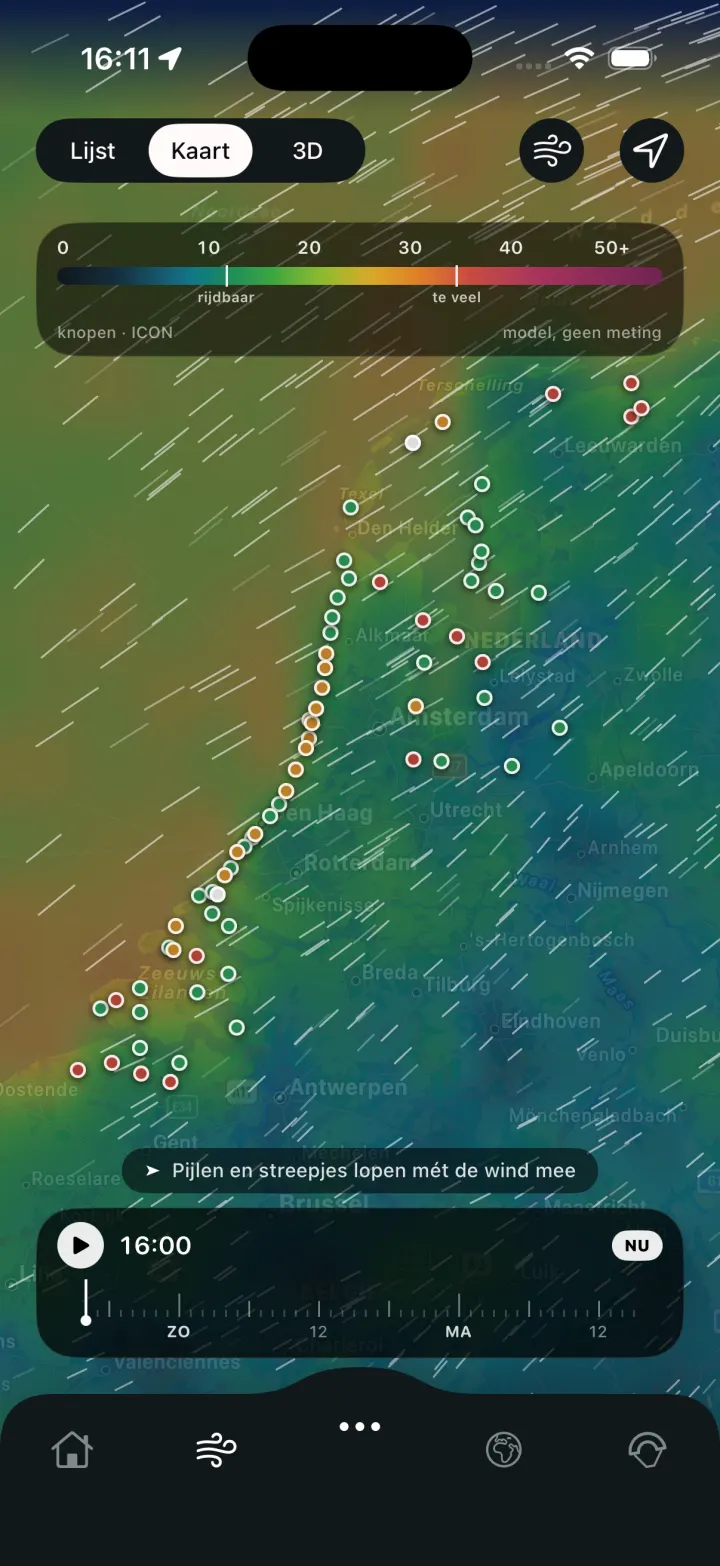
Not one arrow per spot but the whole field: a colour surface with streaks showing where the wind comes from and where it drops off. Drag through the hours and watch the gust travel along the coast.
09
The spot, live
If a camera is broadcasting, it's on the spot page. You see a recent still first — so comparing five spots on the beach doesn't cost your data — and the stream only starts when you tap it.
10
The spot in three dimensions
The coast, the buildings, the wind and the waves as something you can turn around, so you can see what the wind hits before it reaches you.
11
Your own place too
If you ride a small lake that appears on no list, you pin it on the map yourself. You get the same wind, the same verdict and the same alerts as a spot that was already there.
12
The Kite Agenda
Per spot you say what you want: from how many knots, which directions, which tide. The agenda lays the coming days alongside that and keeps only the hours that qualify. Want them in your own calendar? They go in — and out again when the wind turns.
13
Your model as the default
We run the finest-grained model covering this coast by default — a 2.2 kilometre grid. If you decide on Thursday whether you're riding on Saturday, a steadier model tells you more, and you're allowed to make that your default.
14
What to wear
Next to the air and water temperature is what to put on: 5/3 with a hood, or a shorty. Riding a wing? The app uses a wing table instead of kite sizes — that's a different question with a different answer.
Your session
Recording and keeping is free. The coach is MAX.
15
Your session, on your wrist
The Apple Watch records your session without your phone having to come on the water: how many runs you did, your speed, your airtime per jump and where you rode.
16
Every jump on its own
How long you were in the air, how far you went and where on the spot it happened. Reviewable on the map, with the wind of that moment laid over it.
17
The Session CoachMAX
It puts your approach, how much height you hold and what your turns cost you next to your own sessions, not next to a norm. If it sees no relationship, it says nothing — that ability to stay quiet is the point.
18
Your sessions stay yours
Every session goes into your account: your track, the conditions you rode in, your jumps. Sharing is possible, but only when you both switch it on — and your heart rate never goes with it.
19
And gone again, if you want
You can close your account in the app itself, without an email and without explaining. Your sessions, your tracks and your messages leave with it.
20
Join the rankings, or don't
If you want to know how you're doing against the rest of the spot, you switch it on. If you don't, you appear nowhere. Taking part is a button, not a starting position.
21
What's on your profile
Your kites, what you ride and where. Your statistics and what you've saved are yours alone: they don't appear on your profile when someone else looks at it.
22
No watch? Use your phone
No Apple Watch? Then your phone records the session, in a waterproof case under your wetsuit, with the same detector at a hundred readings a second. Start it on the beach, stop it when you come back; you don't look at it in between.
23
The arc of every jumpMAX
Not just how long you were in the air, but how the flight went. The path of every jump, side by side and traceable through the seasons.
24
Calculated twice
What appears on your wrist while you ride is a preview: the detector runs live and doesn't yet know what happened after the landing. At home your phone works through the same session again, with the full picture. Only then is the number final.
25
Say what it was yourself
The detector saw a 2.1 second jump; you know it was a backroll. Put your own name on a measured jump, and you don't just have your session's numbers but what you did in it.
26
Which kite worked when
Across all your sessions: at which wind you spent the most time in the air on which kite, and where it fell short. From your own sessions, not from a size chart.
27
Eight rankings, not one
Airtime, distance, speed, number of jumps and four more. One ranking produces one winner and a list that never catches them; eight are eight different questions, and half of them aren't about who goes fastest.
28
Your session as a file
Export a session as GPX and open it in Strava, Garmin Connect or Google Earth. A recording you made yourself shouldn't be locked inside the app that made it.
29
Downwinders
Riding from A to B, the question on the way isn't how fast you're going but whether you'll make it. You choose the destination on your phone; your wrist shows the bearing and what's left.
Riders together
Kitesurfing is rarely something you do alone.
30
Who's going today
Say you're going, and see who else is there. On the spot page itself, so you don't have to ask in four group chats whether it's worth it.
31
See where the others are
During your session, the riders you allow can see where you are, and you can see them. You switch it on per session; off is where it starts.
32
One conversation per spot
Is it actually blowing, is the water full of weed, is the beach access open, is someone there with a pump. The things no forecast can tell you.
33
The feed from your spots
Follow the riders you ride with and see their sessions and photos come past. Not a timeline of the whole internet — the places you go and the people you meet there.
34
Second-hand, from kitesurfers themselves
Your old kite to someone who's going to use it. With the conversation inside the app, so you don't have to put your phone number in an advert.
35
Lost and found
A board that drifted off, a bar lying on the beach. Report what you're missing or what you found, and the riders at that spot see it.
36
A compass to your mate
On the water you don't need a map, you need a bearing. One arrow on your wrist pointing at the rider you're out with, with the distance underneath. You look for one second and you know which way.
37
What's happening meanwhile
Short messages on your wrist while you ride: that someone's coming on the water, that someone's lost their board. Long enough for one glance, short enough to keep riding.
38
Arranging a session
Saturday eleven o'clock, Brouwersdam, a couple of hours of freestyle. Put it up and the riders who go there see it — and let you know whether they're in.
39
One to one
Not everything belongs in the spot conversation. A message to a single rider works too — about a session, about an advert, or to ask whether they're going tomorrow.
40
Video with your post
That one jump is on film, and then a photo is the wrong shape. Put the video up, with a still in front of it so the feed doesn't cost data on the beach.
41
Who you'd rather not see
Blocking works both ways and is silent: they hear nothing about it and you don't run into each other anywhere. Your settings list who you've blocked, with the way back beside it — otherwise it's the one action in the app you can't find again later.
Getting better
What you're working on, and whether it's landing.
42
What you're working on now
Set one trick as your goal and the app keeps track: what you practised, when, and whether the last few went better. One at a time, because that's how it works on the water too.
43
Your trick book
Per trick what you think of it yourself — practising, lands sometimes, got it — and what the sessions say about it: 31 out of 47.
44
What your month showed
Your records, your approach, your quiver and your tricks across the month. Not as a ranking against others, but as your own line — and one sentence above your sessions saying where you stand.
Learning, and when it goes wrong
The two moments you need someone else.
45
Your lesson at the school down the road
Every spot lists the schools that teach there, with what they offer and what it costs. You book and pay on the spot page itself.
46
Or an hour with a kite coach
Not a school but a rider who can do it: sharpening up, your first jump, or someone watching why that one rotation won't come. Their papers are checked by hand before they appear in the app.
47
What riders wrote about a coach
Not just the average but the words underneath it. 4.8 tells you nothing; “he told me what was going wrong instead of that it was going wrong” does.
48
Showing your sessions to your coach
If you hire a coach, you offer them your sessions and they look at what you did on the water. They have to accept before they see anything, and you withdraw it whenever you like — offering is not the same as handing over.
49
Someone at home who knows you're still out
Switch on your beacon and the people you name yourself can see that you went on the water, where you are, and when something last came through. They don't need the app and they don't need to kitesurf — one link is enough.
50
The help button on your wrist
If you get into trouble, you ask for help from your watch. It goes to the riders nearby and to the lifeguard post that takes part.
After launch
This isn't there yet on 01.11.2026.
51
The app for AndroidLater
We start on iOS, because the Apple Watch is where the session comes from. Android follows; the watch alongside it is a separate question.
52
More coastLater
The whole North Sea and Atlantic coast is in, along with the Mediterranean, the Red Sea and the African coast — twenty-three countries. Croatia, the Baltic, the Caribbean and Brazil are still to come.
53
A Strava connectionLater
Until it exists, you export your session as GPX and send it over yourself. A real connection needs a registration on their side, and we'll arrange that after launch.
The watch
Your phone stays in the car.What you take with you is on your wrist.
The watch is the only part of this product you take on the water. The rest — the spots, the forecast, whether today is your day — you can look at from home. Not this. So below is exactly what it does and what you may expect from it.
Series 4 and newerthe floor for a hundred readings a second
Series 8 and newereight hundred readings a second
Ultrawater contact, which judges a jump
Without your phoneit can stay in the car
Before you start
Kite or wing, and only then start
Two taps instead of one, and that's deliberate. A wing lifts you more gently and sets you down more gently than a kite, so the detector works with different thresholds. A little toggle above a start button is something you look straight past — your eye goes to the big round thing and your thumb follows. Two steps force the choice without making it heavy.
On the water
There's nothing to tap
The moment you start, the watch goes into water mode and switches off its touchscreen — that's the system doing it, not us. So everything runs through the crown and the side button, and the screen is built for that: one big number with three tiles underneath, and you turn the crown to choose which of the four is the big one. No dashboard. In the shore break, with salt on the glass, you read one.
What you feel
A tap on every jump
You get a tap on your wrist as soon as a jump has been counted. The speaker talks in your own language and adds something now and then, but count on the vibration: in wind, speech is the reinforcement and not the main channel. The voice is therefore set slightly higher and slightly slower than default — wind noise sits low in the spectrum, and a low voice disappears into it.
What's underneath
A hundred times a second, and eight hundred on newer watches
A hundred readings a second is the floor, and it's what the rest of the market runs on: that works from Series 4. From Series 8 the watch delivers eight hundred, and that's the difference between seeing a peak and guessing at one in a landing that lasts tens of milliseconds. Making eight hundred a requirement throws away half the watches for a head start you don't need to begin with.
Why a workout
The workout isn't about your heart rate
A workout starts when you do, and it does three things at once: it keeps the app alive when the screen goes off, it unlocks the high sampling rate, and your session lands in your Activity. Your heart rate is the least interesting part of that — and it never goes with a session you share.
Who else is out
Who's riding with you, along the edge
If others are out who have it switched on, they appear as dots along the edge of the screen. The top of the dial is the direction you're heading: whoever is straight ahead sits at the top, whoever is behind you at the bottom. Nothing to read and nothing to work out. If your heading disappears because you're sitting still, they disappear too — an edge that stayed put would be pointing the wrong way.
When it goes wrong
The help button
Asking for help from your wrist, without going through menus. If an alarm is running, the screen takes it over completely and the edge glows: on a wrist you look for half a second, and you don't have to read a colour. Vibration and sound together are hard to miss, even when you're not looking at anything — but don't count on the speaker over distance. That doesn't work in wind, and a safety feature you expect too much from is more dangerous than none.
Afterwards
What's on your wrist is provisional
The numbers during your session come from a calculation running live, with little memory and no hindsight: at the moment you land, the two seconds afterwards that tell a landing from a crash haven't happened yet. When your session ends it goes to your phone in one go, and that works through the same windows again — with your track and, on an Ultra, with the water contact. That is the number that stays. So it can differ slightly from what you read on the beach, and that's not a fault but the intention.
The Session Coach
There's no such thing as a good approach speed.Yours exists.
Every session tracker colours your approach green or red without ever saying what against — and that's a judgement resting on nothing. The Session Coach compares you with your own sessions, says how confident it is, and keeps quiet when there's nothing to say. You choose per session what it watches.
Approachcoming in harder means going higher — if that's how it works for you
Holding upwindstaying where you started, instead of walking back along the beach
Turnskeeping your speed through a turn, because otherwise you drop downwind
The jump itselfhow much you rotated, and whether you rode away
Water startriding again sooner, and drifting less while you're standing
Where the bar is
Your own best third is the bar
The target is the median approach of your best third of jumps. Not a norm from a table and not an average of other riders: there is no good approach speed — it depends on you, your kite, your board, the wind and what you intended. What does exist is the approach your best jumps started from. That doesn't tell you what's good, but it tells you what works for you.
Before it starts
Twelve jumps before it finds anything
Below twelve, your best third is three, and then the target is the average of three coincidences. For the stretches where you hold upwind the limit is eight: such a stretch lasts a minute, and a session produces thirty of them, not two hundred. Until those counts are reached there's no baseline, and a baseline that isn't there beats one that pretends.
The verdict
Three states, not two
Faster, the same, slower. Green-or-red forces a judgement on a difference of a tenth, and then one jump is green and the next is red while you did exactly the same thing. “Like always” is a real answer, and it's usually the right one.
When it says nothing
It's allowed to stay quiet
For one rider the height is in the approach, for another it's in the timing of the send. For that second rider, any approach advice is noise. So the coach first measures whether your airtime actually moves with your approach; if that relationship is too weak, it says so and nothing more. A system that can stay quiet is worth more than one that always calls something out.
What it doesn't know
A correlation is not a cause
That your best jumps started faster doesn't mean coming in faster caused them. The coach measures that they move together, no more — the threshold above which it says anything sits deliberately below what a researcher would call a relationship. It isn't proof; it's a line below which we keep quiet because in your case it demonstrably doesn't move together.
Against what
Today against last month, not against this afternoon
There are two baselines. Your history travels from your phone to your watch at the start, and the session builds one of its own while you ride — that second one exists for a new rider too, and it catches the day when everything is different. As soon as your history is there, it wins. Compare today with today and you take your own bad day as the norm, and get told things are going well.
Holding upwind
Left and right separately
Almost everyone holds height better on one tack than the other. It's the first thing a coach on the beach sees and the last thing you notice yourself, because you compare yourself with yourself ten minutes ago — and that was the other tack. One average across both tacks makes exactly that difference disappear. Under ten percent we don't mention it: below that you're talking about the wind and not about the rider. And it matters: the difference between a session where you stay in front of your car and one where you walk back every half hour is usually in that one tack.
On the water
Two to four words
A tap on your wrist can't say a number, and that's what the voice is for — nothing else. After a jump, your height if there's an estimate that holds up, and otherwise your airtime in seconds, with the unit attached so that “two point four” isn't metres one time and seconds the next. And when you've ridden a stretch, the count: seven out of ten. Beyond that it keeps quiet.
Afterwards
What you felt when you landed stays put
The baseline grows during your session. So the verdict on a jump is stored as you received it and not recalculated later — otherwise the same verdict on the same jump comes out differently half an hour later, and then your session report doesn't match what you experienced on the water.
How we check it
Whether it's doing well, we measure
After your session you can say whether a jump really was a jump. That's the only figure that counts: of everything it counted as a jump, how much did the rider reject. We measure quality in false jumps per hour, not in a percentage that sounds good. What you hand over goes without your name — the improvement set has no column a person fits in.
A subscription is coming
Almost everything is free and stays that way — including recording, keeping and reviewing your own sessions. For the rest there'll be a subscription, and not because that's how it's done: weather data costs money per request, servers cost money per month, and whatever arrives next season has to be built by someone. That's what you pay for, and nothing else — there are no ads in the app and we don't sell anything on.
When we'll introduce it, we don't know yet. Not on launch day, and we're not naming a date we'd only have to push back later. First the app has to spend months on the water; only then is there anything to charge for on the side that costs money. You'll hear about it well before anything changes, and until then everything is open. So this is what we have in mind, and it can still shift.
MAX per year€ 21.00works out at € 1.75 a month
Once a year, and the whole season is sorted.
or
MAX per month€ 2.79cancel any month
For anyone who only needs us in the months it blows.
For now, everyone has MAX.When the subscription starts, we don't know yet, and we'd rather give no date than one we have to take back. It won't be launch day in any case, and it won't happen quietly: you'll hear well in advance, no card is on file, and no trial rolls into a charge by itself.
Free
Always. One free account and nothing else.
Every spot, the wind now and the hourly forecast
Several weather models side by side
Whether today is your day, at your weight and on your kites
What a spot asks of you, with the source beside it
Your favourite spots together, with today's wind
Recording your session on your watch, without your phone
Or with your phone in a case, if you have no watch
Keeping, reviewing and exporting your sessions as GPX
Wind across the map, hour by hour, and the spot in three dimensions
The Kite Agenda: your hours at your spots, in your own calendar
Your trick book, your goal and your monthly progress
Who's going today, and the conversation per spot
Seeing where the others are during your session
Second-hand, lost-and-found and your own gear in one place
Booking a lesson at a school or an hour with a kite coach
The help button on your wrist
Your safety beacon, and the tracking link for whoever stays home
Saying yourself which trick a measured jump was
Your own weather model as the default
MAX
€ 21.00 a year, or € 2.79 a month.
The coach during your sessionOn your watch, by tap or by voice. One focus per session.
Your baselineWhat's normal for you — not for an average rider.
Your jumps in 3DThe arc of every jump, side by side and through the seasons.
Your entire historyEvery session and every ranking, as far back as you go.
A nudge from your own knotsA push message as soon as the forecast at your spot passes the limit you set yourself. A separate limit per spot.
Three coach discountsTen percent off your lesson, three times a year. You book as always; it's already off at checkout.
Measuring and keeping is yours; making sense of it is what you buy. Your own sessions will never sit behind a paywall here — that's not a sentence for a page but a rule written into our database, with the reason next to it.
Before it exists
Closed test · iPhone and Apple Watch
The app already exists.It has just never been wet.
Before launch the app goes to a small group of riders. Not to show what it can do — to find where it lets you down. A jump detector that works on a desk says nothing yet about short, choppy water at thirty knots on the Brouwersdam.
What you get
The app and the Watch app, months before they reach the App Store.
A short line: you report something, and you see it back in the next version.
A say in what stays. At this stage everything is still movable.
What it costs after launch is above. A test place is not a subscription and doesn't quietly become one.
What we ask of you
That you actually ride with it. Five sessions say more than one.
That you tell us what's wrong — including the small things, and especially when you can't say why.
That your sessions may count towards calibrating the jump detection. Separate checkbox, and it can stay off.
You're not tied to anything. One email and you're off the list, without having to explain why.
What you need
An iPhone running iOS 18 or newer.
For sessions on your wrist, an Apple Watch Series 4 or newer. Without a Watch you're still welcome — then you test the spots, the wind and the verdict.
The email address of your Apple ID. That's where the invitation goes; at any other address it won't arrive.
And what a test version is
It can freeze. A session can be lost. A number that's right today may look different in the next version, and sometimes that's because you told us it was wrong. Don't let your decision to go on the water depend on this — that stays yours, with or without an app.
Sign-up is open. We invite in small rounds and watch the spread: different watches, different levels, different spots. You'll hear from us — including when there's no place.
You're not tied to anything.You're only letting us know you want to hear.
Kitesurfing.nl · 01.11.2026
Hear it first.
Leave us a way to reach you. You get one message when we go live, and nothing else until then.